
LANLeap: File Transfer
Local file sharing · Android Available
LANLeap sends the files you choose straight from one device to another on the same local network. Free transfers need no account and no internet, and a phone or computer without the app can receive through a page in its web browser.
- No account to start
- Receive in a browser
- NFC or QR pairing
- 20 languages
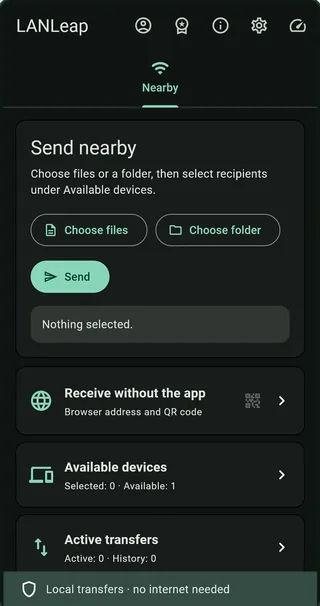
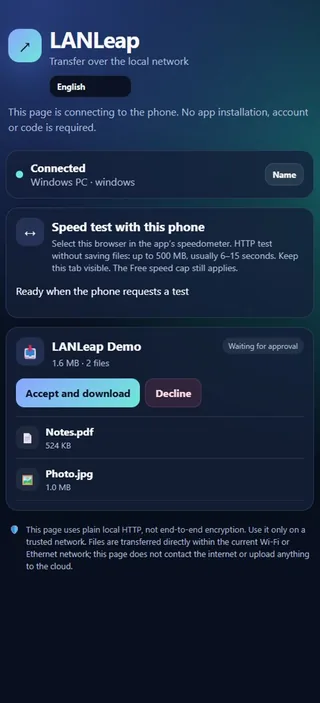
How a transfer works
- Choose what to send: files, photos, videos, a whole folder or selected app packages. You can browse your media and preview supported files first.
- Pick a nearby receiver on the same network.
- The receiver approves, and the files travel directly between the two devices. Nothing is uploaded to the cloud.
No router? Use your phone's own network
Hold another phone against yours. The first touch joins your phone's own Wi-Fi network, and the second opens the transfer page in its browser, with no router and no password to type. iPhones and phones without NFC scan a QR code instead. This is part of the free version.
Devices without the app
A computer, tablet or phone without LANLeap can still take part. It opens a local page in its web browser and receives files there, with no app to install and no account. With Premium, it can also send files back the same way.
Free and Premium
Free local transfers work without an account or internet access, with an app speed limit of 30 Mbit/s.
Premium removes that limit and adds pause and resume, sending from a browser, sending and receiving in the background, and TDLS speed-up on supported devices. Real speed and Wi-Fi features depend on your devices and network.
Premium comes as a 1-month or 6-month subscription, or as a one-time forever purchase. You sign in before buying, and Google Play shows the price in your currency and handles payment. Subscriptions renew until you cancel them in Google Play; the forever purchase never renews.
Security on your network
Transfers between two LANLeap apps use end-to-end encryption. Browser transfers use plain local HTTP, which is not end-to-end encrypted, so use them only on a private network you trust. Only the files you select are sent.
Questions
Does LANLeap need the internet?
Not for free local transfers. Signing in, buying Premium and checking a subscription need a connection.
Can I send files to an iPhone or a computer?
Yes. The other device opens the transfer page in its browser. An iPhone can join by scanning a QR code.
Why can't my devices see each other?
Both devices must be on the same local network. Firewall rules, or Wi-Fi networks that keep their devices apart (often guest or public Wi-Fi), can block the connection. In that case, try your phone's own network instead.
Which languages does it speak?
LANLeap starts in your device's language and offers 20 languages, which you can change in Profile.
Privacy and support
An account is optional for the free version. Firebase Authentication handles sign-in, and RevenueCat and Google Play process purchase information. LANLeap's privacy policy is linked from its Google Play page. For help, email velassi.co@gmail.com and mention LANLeap.
More from Velassi
Want your files organized in the cloud as well? TDrive turns your Telegram Saved Messages into a drive with folders and search. See all our apps.