TDrive: Drive for Telegram
File manager · Android Available
TDrive turns your Telegram account into a personal cloud drive. Your files stay in your own Saved Messages, and TDrive gives them a folder tree, search, previews and a Trash, so they are as easy to manage as files on a computer.
- Folders and search
- Offline downloads
- File previews
- Trash
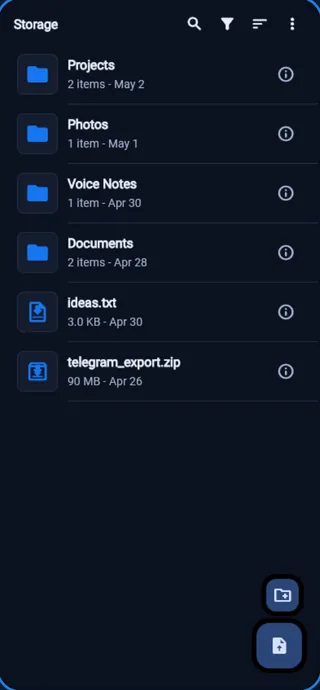
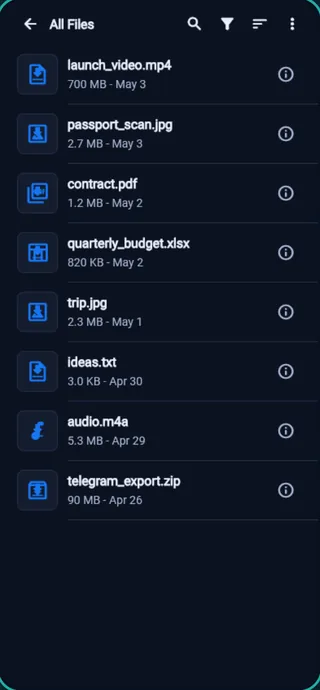
A drive inside the Telegram account you already have
Telegram's Saved Messages is a private chat with yourself, and many people already use it to keep files. It works, but a chat is a poor filing cabinet: everything ends up in one long scroll. TDrive keeps the files where they are and adds the structure a drive needs.
There is no separate cloud account and no extra server holding your files. TDrive uses Saved Messages as its storage and does not scan your other chats, groups or channels.
What you can do with TDrive
- Open your folder tree straight from the Storage screen.
- Upload files from your phone, create folders and move files between them.
- See every file in one All Files view.
- Search, filter and sort by name, type, size or date.
- Select several files at once and act on all of them.
- Mark favorites to keep important files close.
- Restore deleted items from the Trash.
- Download files for offline access.
- Preview photos, videos and supported documents without leaving the app.
How your folders are kept
TDrive keeps one folder structure and stores that organization data in Telegram too, with a recovery copy on your device. If you used an older version of the app, TDrive adapts the data it created.
Questions
Is TDrive an official Telegram app?
No. TDrive is an unofficial app made by Velassi. It is not affiliated with Telegram.
Where are my files stored?
In your own Telegram account, in Saved Messages. TDrive does not upload them to any other cloud.
Can TDrive read my chats?
TDrive works only with Saved Messages. It does not scan your other chats, groups or channels.
What do I need to use it?
An Android phone, a Telegram account and an internet connection for syncing. Files you have downloaded stay available offline.
How much does it cost?
TDrive is free to download from Google Play, with optional in-app purchases.
Privacy and support
TDrive's privacy policy is linked from its Google Play page. For help, email velassi.co@gmail.com and mention TDrive. The people who build the app answer.
More from Velassi
Moving files between devices at home? LANLeap sends them over your local network with no internet needed. See all our apps.